

This one is used a lot. You want object A to move to object B, but as it moves, it slows down as it approaches the destination. It looks something like this…
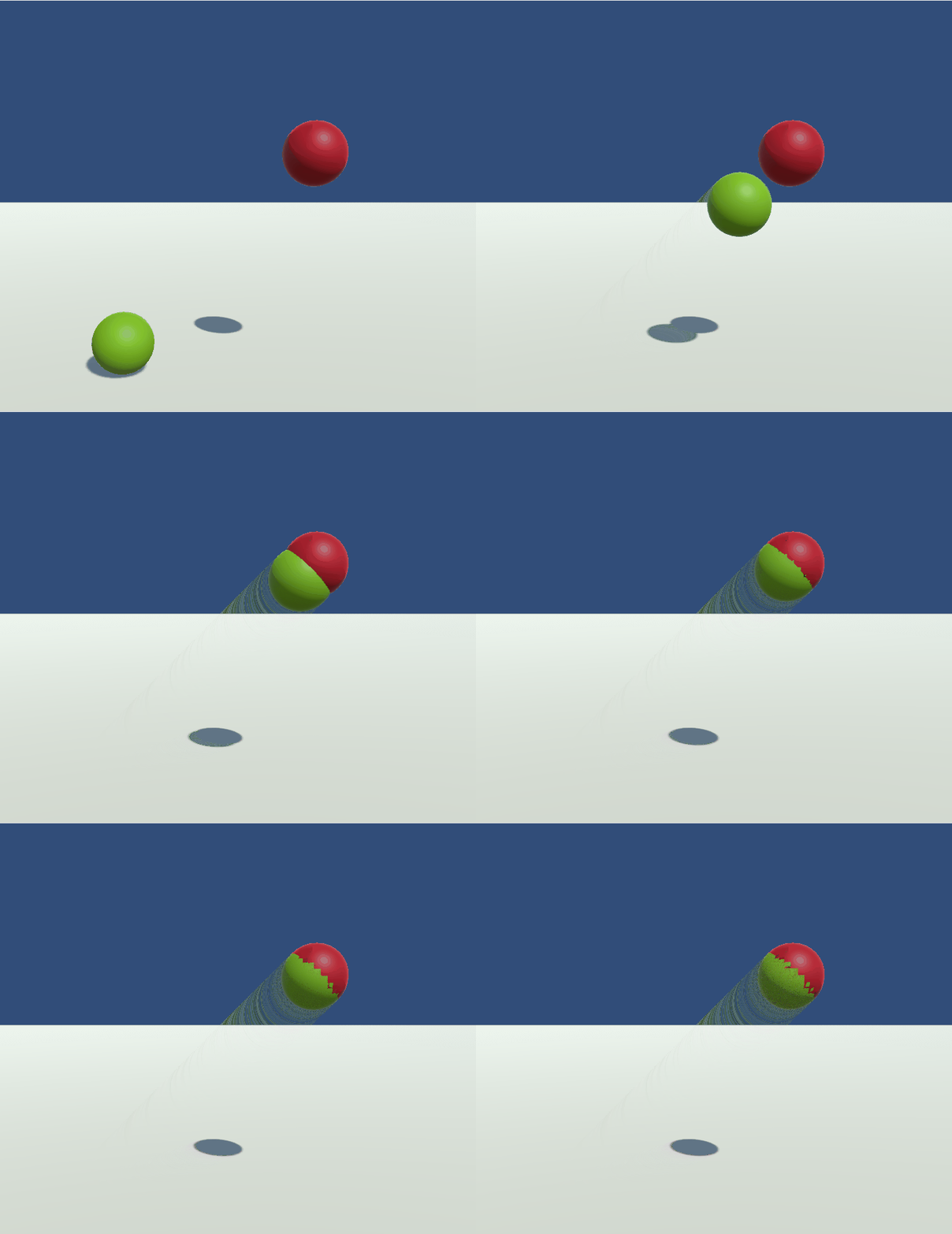
You’ll often see this sort of movement on UI elements or missiles chasing the player (for example)
It’s a simple system; Object A moves a percentage of the distance from A to B. As the distance gets smaller, the speed of movement will slow down
Code to do this will look something like…

Note: If you’ve been programming for a while then there’s a couple of pieces above that’ll make you twitch. Please remember that I’m writing this for clarity. We can optimise later.
What is this code doing?
The “Start” method is just setting everything up and initialising.
The “Update” is where the work is done…
We take the distance from start to end and multiply it by of value < 1.0f. 0.5f will tell it to move 50% of the distance per second, 0.9f is 90% and so on. We then multiply by the fraction of the second used by this update (time delta)
If the distance remaining is smaller than epsilon then we’re close enough to the finish point to be at the finish point
Why Epsilon?
Well, if we don’t use a ‘close enough’ for the end point then the object will never reach the end point as it’ll just keep dividing the distance it has to move so it’ll just keep moving smaller and smaller distances.
To avoid this update always doing work, we add the epsilon so we can switch it off when it’s near enough
The full Unity project can be found in github here

 grumpycodedude.com
Leave a comment